
In the current classroom environment, integrated teaching systems are gradually becoming a common piece of equipment. By consolidating various functions—such as display, interactive operation, and audio playback—into a single unit, they offer both teachers and students a pedagogical experience distinct from that provided by traditional blackboards or projectors. So, how does this type of device actually perform in real-world teaching scenarios? We can explore this by examining the following aspects.
I. Basic Functions and Features of Interactive Flat Panels
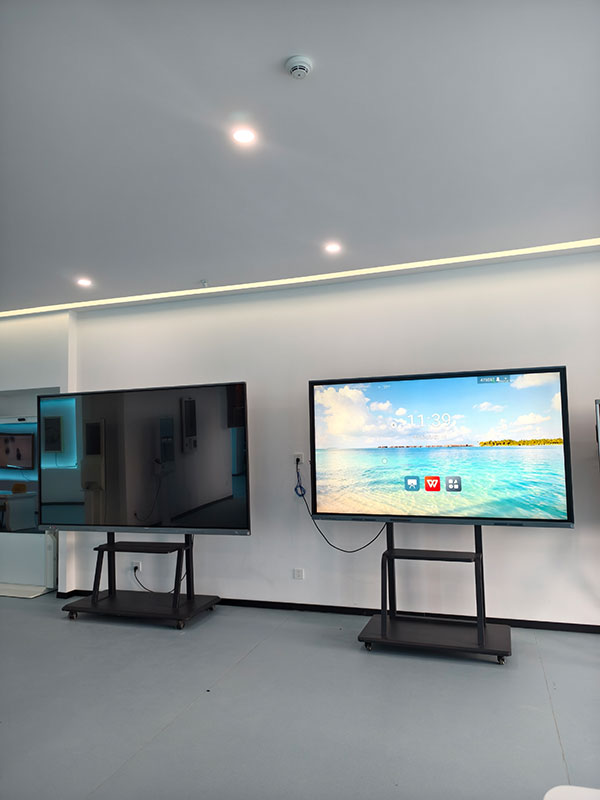
An interactive flat panel typically consists of a large-format touchscreen and an embedded operating system, supporting functions such as touch operation, handwriting input, and multimedia playback. Teachers can write and annotate directly on the screen, play videos, display images, or run educational software. Compared to traditional projection equipment, it requires no external connections to computers or audio systems, offering a more integrated operational experience. Many interactive flat panels also feature wireless screen-mirroring capabilities, allowing teachers to share content from other devices with their students quickly.
In terms of user experience, the touch response of an interactive flat screen is generally highly sensitive, and the writing experience is fluid, making it ideal for teachers to make annotations or sketches on the fly during lectures. Some models even support simultaneous multi-touch input, facilitating group activities and interactive teaching sessions. Regarding audio, the built-in speakers are typically sufficient to meet the standard audio playback requirements of a classroom, eliminating the need for external speakers.
II. Advantages of Interactive Flat Panels in Education
A significant advantage of an interactive board panel its ability to enhance classroom interactivity. Teachers can flexibly access and utilize a wide range of resources—such as images, videos, or interactive courseware—to make teaching content more engaging and vivid. Students, too, can participate actively by using the touchscreen to answer questions or engage with the material, thereby fostering a greater sense of classroom involvement.
Interactive flat panels also streamline device connectivity and operational workflows. Teachers no longer need to frequently switch between devices or calibrate projectors, thereby saving valuable classroom time. Furthermore, the integrated design minimizes cable clutter around the podium area, contributing to a neater and more organized classroom environment.
From the perspective of resource integration, interactive flat panels allow for the centralized storage and management of teaching materials, enabling teachers to easily access past lesson content whenever needed. Some models also support cloud synchronization, facilitating the seamless sharing of resources among teachers across different classrooms.
III. Potential Challenges in the Practical Application of Interactive Flat Panels
Despite their numerous advantages, interactive flat panels may still present certain challenges in practical application. For instance, the initial setup and system configuration of the device may require a certain amount of time, during which teachers must familiarize themselves with the user interface and various functions. For teachers who are less accustomed to electronic devices, mastering touch-based writing or utilizing multimedia tools may require a period of adjustment.
Additionally, the maintenance and upkeep of interactive flat panels require attention. The touchscreen is prone to accumulating fingerprints and dust, necessitating regular cleaning to ensure optimal display clarity. Over time, device performance may degrade due to system updates or hardware aging, requiring timely maintenance or upgrades to ensure continued functionality. In terms of cost, the purchase price of interactive teaching panels is typically higher than that of traditional projection equipment; therefore, schools must make their selection based on their specific budgetary constraints. Power consumption and subsequent maintenance costs should also be taken into consideration.
IV. How to Select the Appropriate Interactive Panel Based on Instructional Needs
When selecting an interactive teaching panel, schools should evaluate various factors, including screen size, resolution, touch precision, and system compatibility. Larger screens are better suited for classrooms with a high student headcount, while high resolution ensures the clarity of both text and images. Touch precision directly impacts the fluidity of writing and operation; therefore, it is advisable to conduct hands-on testing during the purchasing process.
System stability and user-friendliness are equally important. An intuitive user interface enables teachers to quickly master the device, while a stable system minimizes the risk of classroom disruptions. Schools should also consider the device’s expandability—specifically, whether it supports external peripherals or the installation of educational software.
Here’s how we build your classroom tech — from our factory floor to your school.
��� Our factory doesn’t just make screens — we make them reliable, clean, and ready to ship in bulk.
��� Dust-controlled assembly
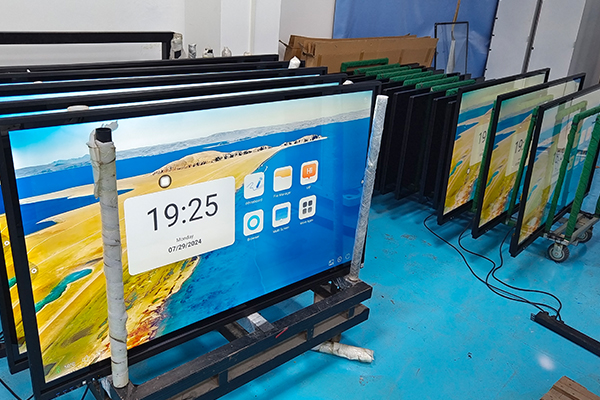
Every panel is put together in a clean, dust-managed space. That means no dust inside, no performance issues later — just smooth, lasting operation.
��� Built for volume, checked for quality
We run full production lines, so whether you need 50 units or 500, we can deliver. And every single one goes through testing — touch, casting, display, you name it — before it leaves.
��� Tested, packed, and ready to go
What you see here isn’t just inventory. It’s fully inspected, classroom-ready interactive panels, stacked and waiting for their new homes.
We’re the factory behind the screen. Let’s build your next order together.
Got a project? Let’s talk volume, specs, and timing.
��� Bulk orders | ✅ Clean production | ��� Ready to ship
Post time: May-22-2026